
Agentic Avatars for Unmatched Customer Experience
Elevate every customer interaction with intelligent avatars that combine advanced AI, dynamic visuals, and lifelike voice synthesis.
Agentic Avatars are revolutionizing customer experience by autonomously understanding intent, making decisions, and acting across channels—delivering proactive, hyper-personalized support that feels truly human. Powered by the KonPro API, easily create unique avatar videos from photos and assign voices powered by cutting-edge AI to ensure your brand speaks with authenticity and impact.
"Autonomous AI Agents for Proactive, Personalized, and Scalable Customer Experience—Powered by KonPro."
Key Features:
- • Public & Custom Avatars: Select from a library of high-quality public avatars or upload, manage, and assign custom avatars—perfect for on-brand experiences.
- • Voice Flexibility: Match each avatar with a default or custom-cloned voice for a distinctive presence and tailored customer interactions.
- • AI Brain Configuration: Choose the underlying large language model and set the personality, instructions, and behavior that fit your business needs.
- • Knowledge Integration: Enhance avatar accuracy with custom URLs and proprietary documents, giving your agent actionable real-world knowledge.
- • Analytics: Monitor avatar talk time, conversation volume, people approached, and task success—insights that drive iterative improvement.
- • Seamless Integrations: Deploy your avatars via easy web widgets, robust APIs, or React components for maximum agility in any tech stack.
Public vs. My Avatars
Public Avatars
Ready-to-use, diverse avatar options are available, each pairable with a matching or custom-selected voice for instant deployment.
My Avatars
Upload your own visuals and build custom avatars, complete with voice cloning for uniquely branded, fully controlled experiences.
Platform Overview
Agentic Avatars streamline the creation of intelligent, customizable AI agents for any digital interface. The platform provides a seamless experience from new avatar creation to advanced feature configuration, enabling businesses to deliver powerful customer engagement and automation solutions.
Creating an Agentic Avatar
Follow these step-by-step instructions to create and configure your first agentic avatar.
Access Agentic Avatars Section
From the left sidebar, navigate to Avatars and select Agentic Avatars. If you haven't created any avatars yet, you'll see a message stating "No agentic avatars yet" with a button to create your first one.
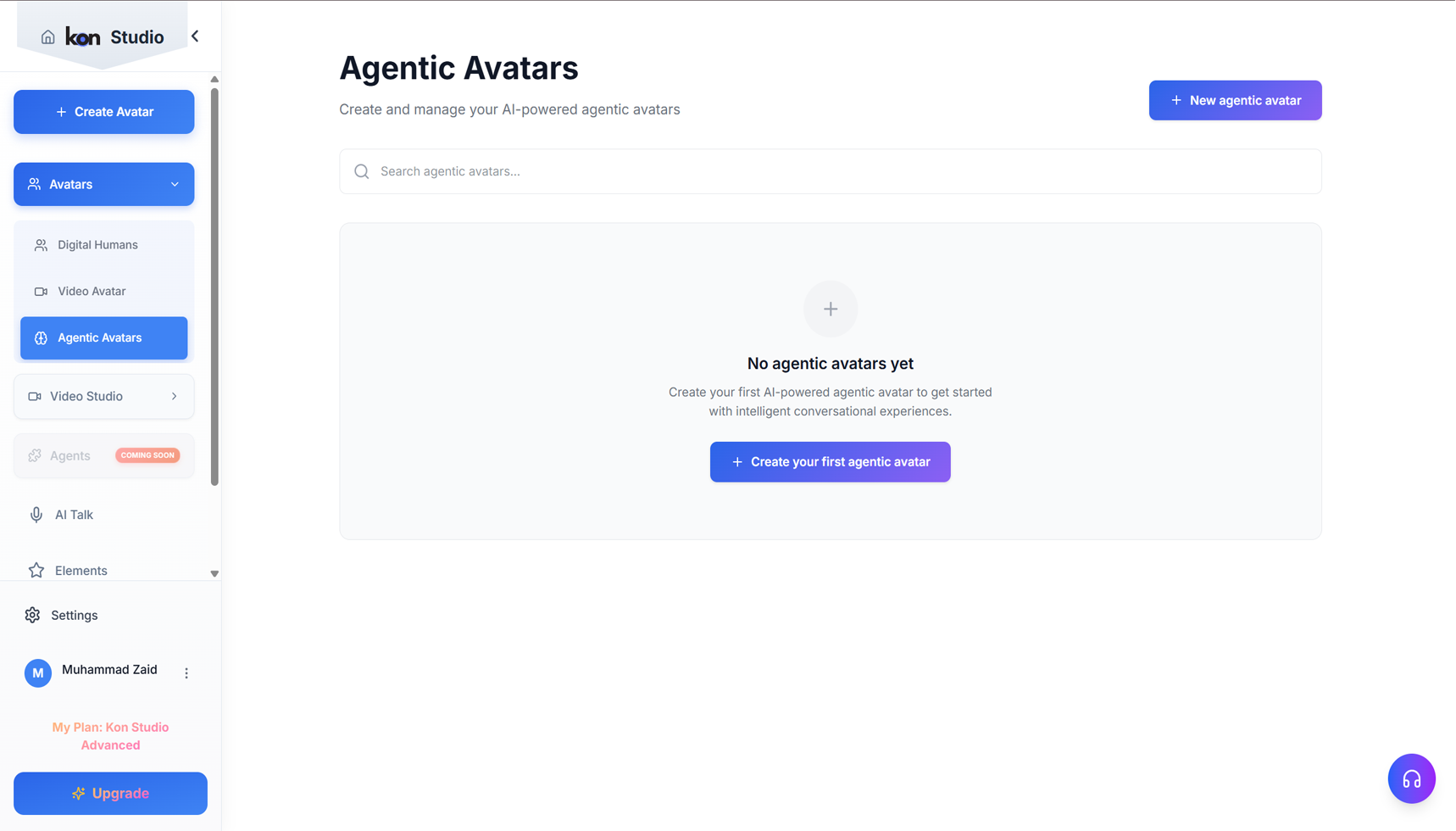
Create a New Agentic Avatar
Click the + New agentic avatar button at the top right, or the Create your first agentic avatar button in the center. This opens a form to name your new avatar.
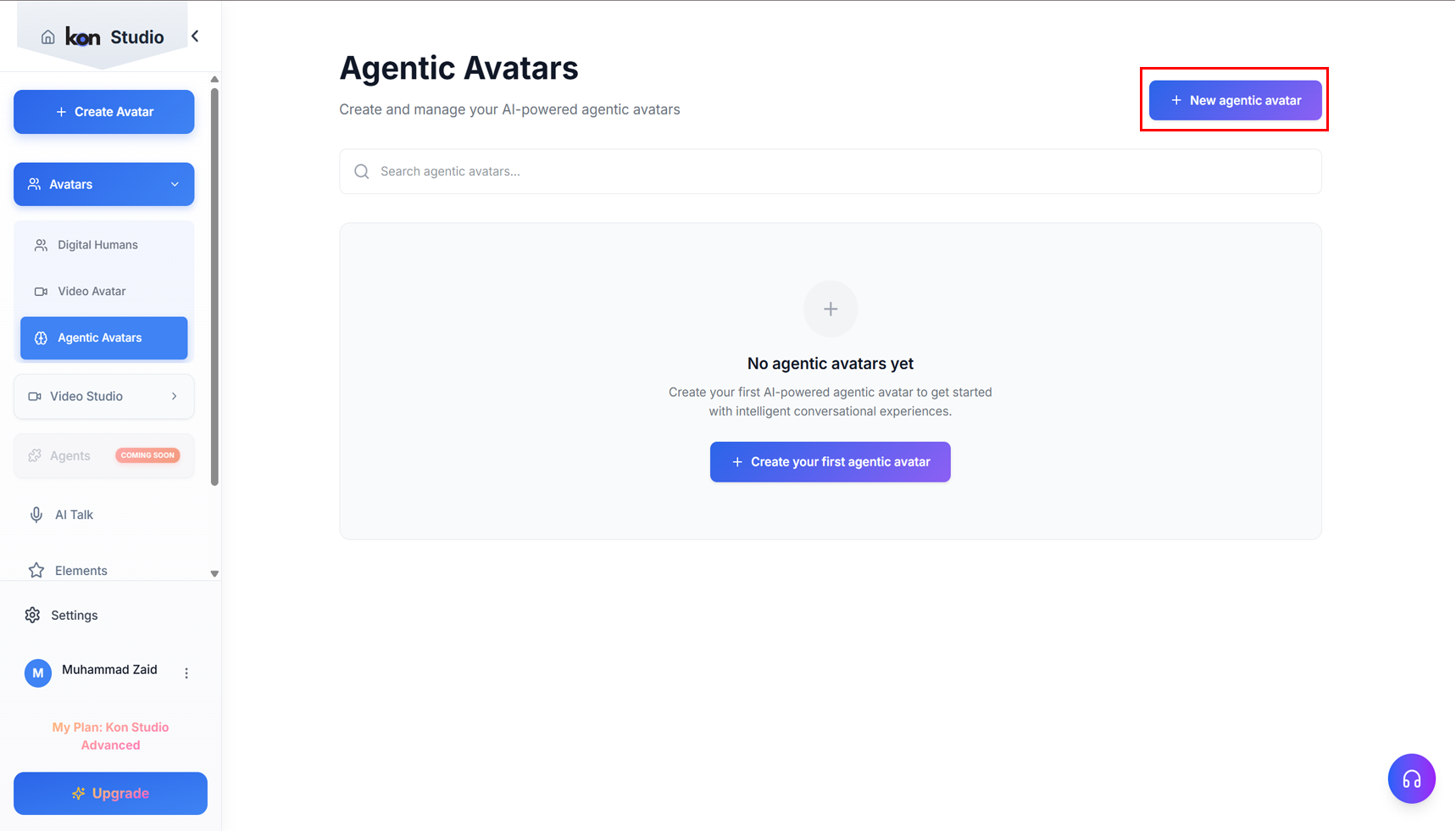
Name Your Agentic Avatar
In the form, enter a descriptive name for your avatar (for example, "Zaid"). Click Create agentic avatar to proceed. You can also cancel if you wish to stop this process.
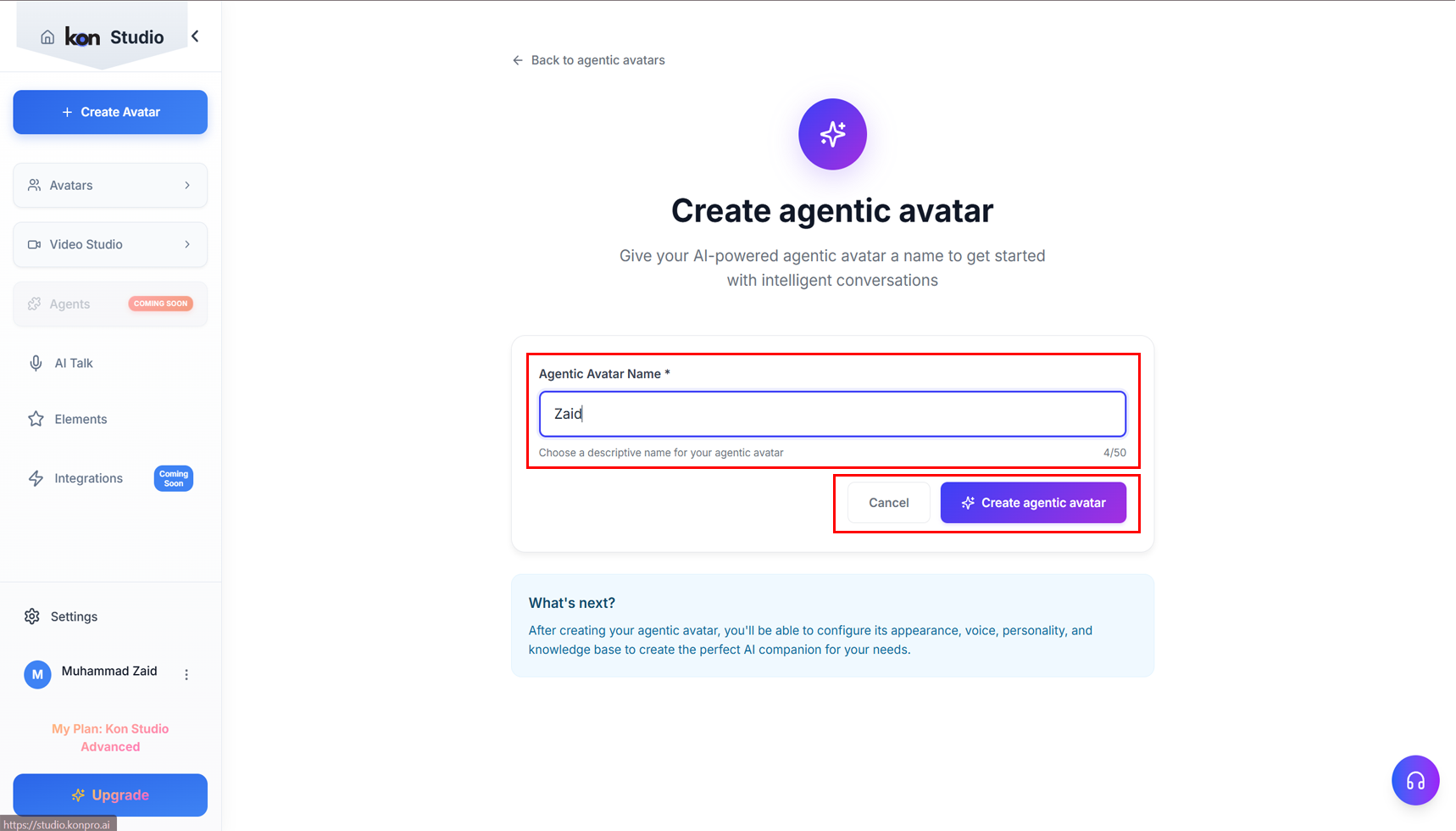
Configure Your Agentic Avatar
Once created, you can configure the avatar's properties:
- • Select from Public Avatars or My Avatars to choose the visual persona.
- • You can further configure the avatar's voice, brain, knowledge base, analysis, and integration options via the navigation tabs.
- • After making changes, be sure to click the Save changes button at the top right to confirm your settings.
Advanced Configuration Options
Once your agentic avatar is created, you can configure its intelligence, knowledge base, analytics, and integration options through the comprehensive configuration interface.
Brain
The Brain section is the core intelligence configuration for your agentic avatar, where you define its personality, behavior, and cognitive capabilities.
LLM Selection
- • Choose from different language model providers and versions (e.g., GPT-3.5 Turbo)
- • Fallback system automatically redirects conversations if the chosen model becomes unavailable
Define Brain Configuration
Description:
Set the avatar's core personality and communication style. Example: "I am a helpful and knowledgeable AI assistant designed to provide accurate information and assistance. I communicate professionally yet warmly, adapting my responses to match the context and needs of each conversation."
Instructions:
Provide specific behavioral guidelines such as:
- • Be helpful, friendly, and professional in all interactions
- • Provide accurate and well-researched information
- • Ask clarifying questions when you need more context
- • Admit when you don't know something rather than guessing
Knowledge Base
The Knowledge Base empowers your avatar with access to relevant information sources for more accurate and contextual responses.
Knowledge URLs
- • Add URLs to websites, documentation, or online resources that your avatar should reference
- • Click + Add URL to include web-based knowledge sources
Knowledge Files
- • Upload documents, PDFs, or text files containing relevant information
- • Supported formats: PDF, TXT, DOC, DOCX
- • Status shows "File upload coming soon" for document processing capabilities
Note: This feature ensures your avatar can provide domain-specific, accurate information by referencing your curated knowledge sources.
Analysis
The Analysis section provides comprehensive performance tracking and interaction metrics for your agentic avatar.
Key Metrics Dashboard
Agent Talk Time
Total conversation duration (e.g., 2.4h over last 7 days, +15% from previous week)
People Approached
Number of users who interacted (e.g., 127 users, +23% growth)
Conversations
Total conversation count (e.g., 89 conversations, +8% increase)
Success Rate
Task completion percentage (e.g., 94% success rate, +5% improvement)
Weekly Activity Tracking
- • Visual calendar showing daily interaction patterns
- • Performance trends and comparative analytics
- • Data-driven insights for optimization
Integration
The Integration feature enables seamless deployment and connection with external systems and platforms.
Web Widget
- • HTML Embed Code: Ready-to-use snippet for embedding your avatar directly into websites
- • Copy Code functionality for easy implementation
- • Customizable positioning and styling options
API Integration
- • REST API Access: Programmatic integration using backend systems
- • Get API Key functionality for secure authentication
- • Code examples and implementation guides
- • Direct conversation handling via API endpoints
React Component
- • Pre-built React Component: For seamless integration into React applications
- • Install Package option for npm/yarn installation
- • Component includes built-in styling and functionality
- • Easy customization and configuration options
Note: These integration methods ensure your agentic avatar can be deployed across websites, applications, and custom platforms with minimal development effort.
Prerequisites
Photo Requirements
For best results, use high-quality photos with clear facial features. The AI works best with:
- • Clear, well-lit photos
- • Front-facing or slightly angled faces
- • High resolution (minimum 512x512 pixels)
- • Single person per photo
- • Minimal background distractions
API Setup
Ensure you have your KonPro API key ready. You can find it in your account settings under the Subscriptions tab.
Settings → Subscriptions → KonPro API → API Token
Create Your Photo Avatar
Use the photo avatar endpoint to transform your photos into speaking avatars. This endpoint processes your photo and creates a digital avatar that can speak with natural voice synthesis.
Note: Photo processing may take 2-5 minutes depending on image complexity and server load.
API Integration
The KonPro API provides endpoints for creating and managing agentic avatars. You can integrate these endpoints into your applications to automate avatar creation and management processes.
You'll receive a response containing the avatar ID and processing status when creating avatars through the API.
Generate Avatar Video
Once your photo avatar is created, you can generate videos with custom text or audio. The avatar will speak naturally with synchronized lip movements and facial expressions.
Video Generation Process
The video generation process uses your created avatar to produce high-quality videos with natural speech patterns. The system handles text-to-speech conversion, lip synchronization, and facial expression mapping automatically.
The response will include a video ID and estimated processing time for your generated content.
Real-time Avatar Streaming
For interactive applications, you can stream your photo avatar in real-time. This enables live conversations, customer support, and interactive experiences.
Streaming Features: Real-time lip sync, facial expressions, voice synthesis, and interactive responses.
Real-time Integration
Real-time streaming enables interactive conversations with your avatar. The system uses WebSocket connections to provide low-latency communication, allowing for natural back-and-forth conversations with synchronized lip movements and facial expressions.
The streaming service handles avatar responses, video frame delivery, and voice synthesis in real-time, creating an immersive interactive experience for your users.
Use Cases
Agentic Avatars are perfect for various customer experience applications:
Customer Service
24/7 virtual customer support representatives
Sales & Marketing
Personalized product demonstrations and sales pitches
Training & Education
Interactive training modules and educational content
Entertainment
Virtual hosts, game characters, and interactive experiences
Conclusion
Agentic Avatars revolutionize customer experience by transforming static photos into intelligent, conversational agents. With KonPro's advanced AI technology, you can create personalized, engaging interactions that scale across your entire customer base.
Start building your agentic avatar today and provide your customers with memorable, human-like interactions powered by cutting-edge AI.